

Description
Personalize Your Browser with UNCC Theme
Overview
The UNCC Theme is a desktop browser extension designed to personalize the user’s browsing environment with the official visual identity of the University of North Carolina at Charlotte. Developed by the UNC Charlotte College of Engineering, this theme enhances the aesthetic experience for users affiliated with the university. It serves as a digital representation of institutional pride, offering a consistent visual presence across web browsers.
Target users include students, faculty, staff, and alumni of UNC Charlotte who wish to express their affiliation through a customized browser interface. The theme is particularly useful during academic events, virtual campus tours, or remote learning sessions, where a cohesive university presence can foster community engagement. It also supports branding initiatives by aligning digital experiences with official university colors and design elements.
The developer did not provide additional system requirements or detailed usage scenarios beyond the theme’s visual customization purpose. No performance impact or resource usage details were specified.
Key Features & Capabilities
- Official University Design – Reflects the authentic visual identity of UNC Charlotte, including official colors, logos, and layout principles from the College of Engineering.
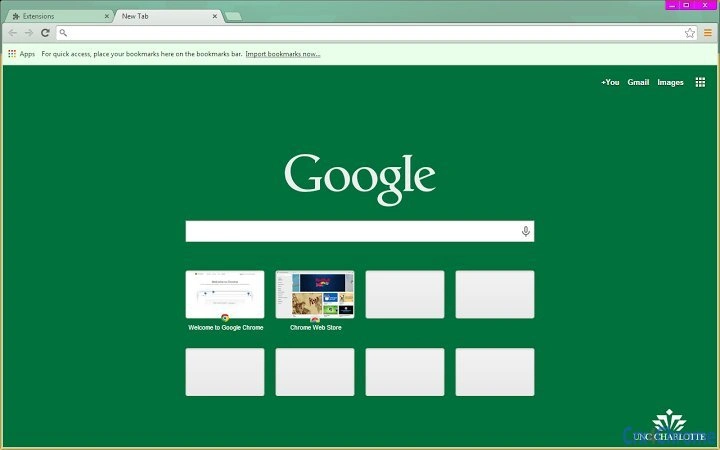
- Browser Customization – Applies a consistent visual style across supported browsers, enhancing the look of the browser’s toolbar, tabs, and new tab page.
- Lightweight Implementation – At just 512 KB, the theme is designed for minimal system impact and fast installation.
- Easy Accessibility – Available through browser extensions platforms, allowing users to apply the theme with a single click.
- Community Identity – Supports university spirit by enabling users to display their affiliation digitally.
Users can apply the theme to reinforce their connection to UNC Charlotte during online classes, virtual meetings, or when sharing their digital workspace. The theme is especially beneficial for departments and student organizations promoting university values. It does not alter browser functionality, focusing solely on visual presentation.
User Interface, Workflow & Performance
The theme operates entirely through the browser’s extension interface, requiring no additional configuration. Users can install it directly from the browser’s extension store, where it appears under the official UNCC branding. The interface remains unobtrusive, with no pop-ups, settings menus, or background processes.
Navigating the browser remains unchanged; the theme only modifies visual elements such as the background, tab color, and toolbar appearance. The workflow is streamlined—install, apply, and enjoy. No user input is required beyond the initial setup.
The developer did not specify resource usage details. Performance observations are based on general software behavior patterns. The theme is expected to have negligible impact on CPU or RAM usage due to its lightweight nature. Stability is assumed to be high, as browser themes typically do not interfere with core browser operations.
Compatibility & System Requirements
The UNCC Theme is compatible with Windows, Mac, and Linux operating systems. It supports major browsers available on these platforms, though specific browser versions were not listed. The installation size is 512 KB, which is minimal and suitable for systems with limited storage.
Exact system requirements were not listed. Compatibility information was partially provided. No hardware specifications were included. The theme does not require administrative privileges for installation.
Pros and Cons
Pros
- Official university branding enhances identity and pride
- Lightweight at only 512 KB
- Simple installation and immediate visual impact
- Available for Windows, Mac, and Linux
- Free to download and use
Cons
- No customization options beyond the default design
- Does not support advanced visual adjustments
- Functionality limited to appearance only
- Updates may require manual checks
- Not suitable for users not affiliated with UNC Charlotte
FAQ Section
Is the UNCC Theme available for all browsers?
The theme is available through browser extension platforms, but specific browser compatibility was not detailed. It is designed for browsers that support theme extensions.
Is the theme safe to install?
Yes, the theme is developed by the UNC Charlotte College of Engineering and distributed through official browser stores. No malicious components were reported.
Does the theme require an internet connection to work?
Once installed, the theme functions offline. However, updates may require an internet connection.
Can I customize the theme’s colors or layout?
Customization options are not available. The theme applies the official UNCC design as a fixed template.
How often is the theme updated?
Updates are released as needed, with the latest version being 1.0. The developer did not specify a regular update schedule.
Final Thoughts + CTA
The UNCC Theme offers a simple yet meaningful way to express institutional affiliation through a browser interface. While it serves a narrow purpose—visual customization—it does so effectively and efficiently. Its lightweight design, official branding, and cross-platform availability make it a valuable tool for students, faculty, and alumni seeking to represent their university digitally.
Though it lacks advanced features or customization, its focus on authenticity and ease of use aligns with its intended audience. For those connected to UNC Charlotte, this theme is more than a visual tweak—it’s a badge of belonging.
Download UNCC Theme now
Guides & Tutorials for UNC Charlotte Theme for Chrome
How to install UNC Charlotte Theme for Chrome
- Click the Preview / Download button above.
- Once redirected, accept the terms and click Install.
- Wait for the UNC Charlotte Theme for Chrome download to finish on your device.
How to use UNC Charlotte Theme for Chrome
This software is primarily used for its core features described above. Open the app after installation to explore its capabilities.
User Reviews for UNC Charlotte Theme for Chrome 0
No reviews found





